Labels

.NET Job Questions About Java Absract class Abstract class Abstract Class and Interface Aggregation ajax aop apache ofbiz Apache ofbiz tutrial Association authentication autocad basics batch Binary Tree bootstrap loader in java build Builder design pattern C++ Job Questions caching CallableStatement in java certifications Chain of responsibility Design pattern charts check parentheses in a string Classes classloader in java classloading concept code quality collage level java program Composition concurrency Concurrency Tutorial Converting InputStream to String Core Java core java concept core java interview questions Core Java Interview Questions Core Java Questions core java tutorial CyclicBarrier in Java data structures database Database Job Questions datetime in c# DB Db2 SQL Replication deserialization in java Design Patterns designpatterns Downloads dtd Eclipse ejb example/sample code exception handling in core java file handling injava File I/O vs Memory-Mapped Filter first program in spring flex Garbage Collection Generics concept in java grails groovy and grails Guice Heap hibernate Hibernate Interview Questions how-to IBM DB2 IBM DB2 Tutorial ide immutable Interceptor Interface interview Interview Questions for Advanced JAVA investment bank j2ee java JAVA Code Examples Java 7 java changes java class loading JAVA Classes and Objects Java Classloader concept Java classloading concept java cloning concept java collection Java collection interview questions Java Collections java concurrency Java CountDownLatch java definiton Java design pattern Java EE 5 Java EE 6 Java Exceptions Java file Java Garbage Collection Java generics Java Glossary java hot concept java immutable concept Java Interface Java interview Question java interview question 2012 java interview question answer Java Interview Questions Java Interview Questions and Answers java interview topic java investment bank Java Job Questions java multithreading java multithreading concept java new features Java Packages java proxy object java questions Java Serialization Java serialization concept java serialization interview question java session concept java string Java Swings Questions java synchronization java threading Java Threads Questions java tutorial java util; java collections; java questions java volatile java volatile interview question Java Wrapper Classes java.java1.5 java.lang.ClassCastException JavaNotes javascript JAX-WS jdbc JDBC JDBC Database connection jdk 1.5 features JDK 1.5 new features Concurrent HashMap JMS interview question JMS tutorial job JSESSIONID concept JSESSIONID interview Question JSF jsp JSP Interview Question JSP taglib JSTL with JSP Junit Junit Concept Junit interview question.Best Practices to write JUnit test cases in Java JVM Linux - Unix tutorial Marker Interfaces MD5 encryption and decryption messaging MNC software java interview question musix NCR java interview question Networking Job Questions news Object Serialization Objects ojdbc14.jar OOP Oracle Oracle SQL Query for two timestamp difference orm own JavaScript function call in Apache ofbiz Packages Palm Apps patterns pdf persistence Portal Portlet Spring Integration Prime number test in java programs Rails Reboot remote computers REST Ruby Sample application schema SCJP security Senior java developer interviews servlet3 servlets session tracking singleton design pattern Spring Spring 2.5 Framework spring ebook Spring framework concept spring MVC spring pdf Spring Security Spring Security interview questions SQL SQL performance SQL Query to create xml file Sql Query tuning ssis and ssrs StAX and XML string concept string immutable string in java strings struts Struts2 Struts2 integration synchronization works in java Technical Interview testing tips Tomcat top Tutorial Volatile in deep Volatile working concept web Web Developer Job Questions web services weblogic Weblogic Application Server websphere what is JSESSIONID xml XML parsing in java XML with Java xslt


Showing posts with label websphere. Show all posts

Thursday, 25 July 2013

Form based authentication - logout

When using form based authentication in a J2EE application, the standard way to logout the user would be to invalidate the user session on the web server. In a simple servlet, the logout steps would look like this:

public void doGet(HttpServletRequest req, HttpServletResponse resp) throws
ServletException, IOException
{
req.getSession().invalidate();
resp.sendRedirect("/myapp/");
}


This is quite simple way for implementing logout. There is also another, easier, way to logout the user when using WebSphere Application Server. All you have to do is have a form with the action set to "ibm_security_logout".
< FORM METHOD=POST
ACTION="ibm_security_logout" NAME="logoutForm" >
Click this button to log out:
< input type="submit" name="logout" value="Logout" >
< INPUT TYPE="HIDDEN" name="logoutExitPage" VALUE="/myapp/" >
< /form >


In the above example, the hidden field "logoutExitPage" is the page the user is sent to after logout.

Wednesday, 24 July 2013

WebSEAL: Secure only login page

login redirects is a new feature in Tivoli Access Manager V5.1 . With this new function, all users are can be to the same configured URL after successful authentication. In order to implement secure login pages followed by secure and unsecure pages, the following steps have to be followed:
  1. Install and configure Tivoli Access Manager for e-business with atleast one WebSEAL Server.
  2. Define an ACL that requires authenticated access for the chosen secured resources. Remember that an ACL that is not attached to protected resources has no impact.
    • acl create secure-access-for-all
    • acl modify secure-access-for-all set any-other rTl
    • acl modify secure-access-for-all set unauthenticatedl
  3. Attach the ACL to the resources requiring authentication. The failure of an unauthenticated request when attempting to access this page will initiate the WebSEAL authentication processing. The precise objects the ACL will be attached to will depends upon the configuration of the environment, namely which host the WebSEAL server is on, and which instance is being used.
    • acl attach /WebSEAL//portal/myportal secure-access-for-all
  4. Configure WebSEAL for forms-based authentication over HTTPS protocol by setting the forms-auth parameter to https in the [forms] stanza of the WebSEAL instance's configuration file, that is
    /etc/webseald-.conf
    Note that this indirectly prevents login over HTTP.
  5. Configure WebSEAL to share the same user session across HTTP and HTTPS protocols. This change is made in the same configuration file as in the preceding step, by setting the value of the use-same-session parameter of the [session] stanza to true.
  6. Configure WebSEAL to automatically redirect to the secure portal page over HTTP. This change is made in the same configuration file as in the preceding step, by setting the value of the login-redirect parameter of the [acnt-mgt] stanza to http://:/portal/myportal. Note that this resource must be accessible to all users, and so it is recommended that the secure-access-for-all ACL described in the first step of this procedure be attached to this resource.
  7. Configure WebSEAL to allow for automatic redirects when using the forms authentication method. This change is made in the same configuration file as in the preceding step, by setting the value of the redirect parameter of the [enable-redirects] stanza to forms-auth.
  8. Customize the WebSEAL error page for Forbidden (HTTP status code 403) to detect if the user has made the request over HTTP, and automatically redirect to HTTPS to login. Add the code fragment from listing 1 at the top of the file
    /www-/lib/errors//38cf0427.html.
  9. Restart the WebSEAL instance. On a machine with multiple instances, ensure that the correct instance is restarted.
Reference:

Monday, 22 July 2013

IBM Security Auditing Service

IBM Security Auditing Service Technology is an integral part of the WebSphere Application Server security mechanisms that assure the integrity of a secure computing environment. Enhancing the primary security functionality that ensures requestors have proper authentication and authorization to controlled resources, the security auditing feature provides a means to record those authentication and authorization events.WebSphere Application Server Version 6 offers a technology preview of the security auditing feature. The WebSphere Application Server is instrumented to generate security auditing records for certain security events. The security audit event generators include authentication, access control, and principal and credential mappings for Java 2 Platform, Enterprise Edition applications. Security auditing event records are useful in answering the following questions:
  • Which user at what time attempted to access a given resource?
  • Was the access attempt successful or did it fail?
Security auditing is not so much about protecting resources as it is about holding users accountable, providing verifiable evidence for non-repudiation, and enabling vulnerability analysis. The following 5 types of security events are auditable in WebSphere Application Server:
  1. AUTHN - Authentication eventent
  2. AUTHZ - Access control even
  3. MAPPING - J2EE connector architecture credential mapping event
  4. ACCESS - J2EE web resource access event
  5. LOGOUT - Terminate login session eventnt
Each of the above 5 events may be audited for any of the following outcomes
  1. SUCCESS - Request passed authentication and access control check
  2. DENIED - Request access was denied
  3. REDIRECT - Web request is redirected to the login page
  4. FAILURE - Security service provider failed while processing request
  5. INFO - Security service provider generated an informational message while processing request
  6. WARNING - Security service provider generated a warning message while processing request
  7. ERROR - Request generated an error condition
The security audit settings can be modified by going to Secure administration, applications, and infrastructure > Custom properties and modifying the "com.ibm.audit.auditSpecification" property to look like this:
J2EE=EVENT=EVENT-OUTCOME=enabled/disabled
Each event must be seperated by a ":". It will look like this:
J2EE=AUTHN=failure=enabled:J2EE=AUTHZ=failure=enabled
More information can be obtained at WebSphere Application Server Information Center or by downloading the IBM Security Auditing Service Technology Preview.

Monday, 15 July 2013

Weblogic Security

WebLogic Security Framework provides a simplified application programming interface (API) that can be used by security and application developers to define security services. WebLogic Security Framework also acts as an intermediary between the WebLogic containers (Web and EJB), the Resource containers, and the security providers. In this post, I describe a few concepts and features available in Weblogic Server 9.2 for authentication and authorization and auditing.
Authentication
Authentication is the process of determining whether the client who it claims to be. Generally, authentication is accomplished by the client sending credentials (username/password, certificate, security token etc.) and the server verifying the credentials. WebLogic uses the authentication classes of the Java Authentication and Authorization Service (JAAS), for authentication.
Identity Assertion
Weblogic also supports the concept of perimeter-based authentication, where the actual authentication process occurs at an application perimeter such as a Web server, firewall, or VPN, and outside of WebLogic Server. The perimeter authentication provider then asserts the identity to the Weblogic server using different "Security token types" (e.g., Microsoft Passport, SAML Assertions, or tokens from third-party commercial authentication products). The "security tokens" are validated by the Weblogic Server, which then assigns a username to the token. This username is used by the authentication providers to populate the "Subject" that will be used in authorization. IBM WebSphere implements this by the use of Trust Association Interceptors. WebLogic Server 's support for perimeter-based authentication supports the ability to propagate security tokes over multiple protocols, such as HTTP, and IIOP-CSIv2 (used for EJB layer security).
Authorization
Authorization phase determines if the user has access to the requested application resource. Authorization in Weblogic is divided in to two steps
  1. Decision
  2. Adjudication (Enforce)

Decision
In this step, the WebLogic Security Framework uses the request parameters and user information to determine the roles associated with the user (for this the security framework uses the configured Role Mapping Providers). Based on the user's roles, the Authorization provider determines whether the subject is entitled to access the requested resource i.e the Authorization provider makes the Access Decision. If there are multiple Authorization providers configured, the WebLogic Security Framework delegates the job of reconciling any conflicts in the Access Decisions to the Adjudication provider
Adjudication
The Adjudication provider is required to tally the multiple Access Decisions and render a verdict. The Adjudication provider returns either a TRUE or FALSE verdict to the Authorization providers, which forward it to the resource container through the WebLogic Security Framework.
  • If the decision is TRUE, the resource container dispatches the request to the protected WebLogic resource.
  • If the decision is FALSE, the resource container throws a security exception that indicates that the requestor was not authorized to perform the requested access on the protected WebLogic resource.

Auditing
The auditing process is initiated when a resource container passes a user's authentication information to the WebLogic Security Framework as part of a login request. If, in addition to providing authentication services, the Authentication provider is designed to post audit events, the Authentication provider instantiates an AuditEvent object. The AuditEvent object includes information such as the event type and an audit severity level. The Authentication provider then calls the Auditor Service in the WebLogic Security Framework, passing in the AuditEvent object. The Auditor Service passes the AuditEvent object to the configured Auditing providers' runtime classes, enabling audit event recording. Depending on the Auditing provider implementation, audit records may be written to a file, a database, or some other persistent storage medium.

Friday, 12 July 2013

Single Sign-On: Windows and WebSphere

A common requirement when implementing single sign-on solutions within organizations is to be able to share the authentication information betweeen the user desktop and the web application. This requirement becomes more important for intranet applications. WebSphere Application Server provides the capability to acheive Single Sign-On with Windows and Web Applications by providing a trust association interceptor (TAI) that uses the Simple and Protected GSS-API Negotiation Mechanism (SPNEGO) to securely negotiate and authenticate HTTP requests for secured resources in WebSphere Application Server. When the SPNEGO TAI is initialized, authentication for all the Web Applications on that server goes through the TAI. HTTP users log in and authenticate only once at their desktop and are authenticated (internally) with WebSphere Application Server. The SPNEGO TAI is only visible to the WebSphere administrator who is responsible for ensuring a proper configuration, capacity, and maintenance of the Web environment.
Additional Requirements (Apart from WebSphere Application Server 6.1)
  • Microsoft’s Windows 2000 or Windows 2003 Servers with Active Directory domain and associated Kerberos Key Distribution Center (KDC).
  • Microsoft Internet Explorer Version 5.5 or later, Mozilla Firefox Version 1.0, or any other client application that supports SPNEGO mechanism.

Additional Considerations
  • The LDAP Server used by WebSphere and the Windows Active Directory must be the same for the default configuration, if different, then a custom login module (provided with WAS) must be configured to handle authentication.
  • The end user must configure the Web browser or .NET application to issue HTTP requests that are processed by the SPNEGO TAI.
  • The Web administrator is responsible for configuring the SPNEGO TAI of WebSphere Application Server to respond to HTTP requests of the client.
  • The WebSphere Application Server administrator is responsible for configuring WebSphere Application Server and the SPNEGO TAI for optimum installation performance.
  • Kerberos version 5 is required.
  • RC4-HMAC encryption is only supported when using a Windows 2003 Server as Kerberos key distribution center (KDC) and is not supported with a Windows 2000 Server.

Security Enhancements in WebSphere 6.1

In his latest article, Keys Botzum gives an overview of the the security enhancements to WebSphere Application Server 6.1. Here is a a list of the enhancements, for more details, read the article.
  • Default Security Settings: Some of the default settings have been changed in the new version:
    • Administrative security is enabled automatically during installation.
    • All internal transports are authenticated by default.
    • Most internal transports are encrypted by default.
    • The default encryption keys are eliminated. A cell-specific set of keys is created automatically.
    • JNDI is read-only by default to all.
    • Messaging limits connections to only authenticated users granted the bus connect role by default. AllAuthenticated no longer has that role by default.
  • Simplified certificate and key management.
    • The admin client can query the server and automatically import the server's signing certificate
    • The admin tools can be used to generate certificates and certificate requests, import keys and certificates, manage certificates and keys, and even share them across the cell.
    • Programmatic APIs for applications to obtain URLStreamHandlers, SSLContext instances, and SSLSocketFactories, based on the WebSphere Application Server-managed SSL configuration.
    • LTPA encryption keys are automatically changed at regular intervals. To avoid outages, multiple key versions are simultaneously supported.
  • Support for federated repositories.
    • Support for file registry
    • Support for multiple LDAP registries.
    • Support for LDAP failover.
  • Fine-grained authorization control (below cell level) for administrative users.
  • Single Sign-On from windows desktops to intranet applications.

Thursday, 11 July 2013

Memory Leaks in WebSphere

In their latest article titled "Memory leak detection and analysis in WebSphere Application Server", Indrajit Poddar and Robbie John Minshall discuss the techniques available in WebSphere Application Server 6.1 to address Java heap memory leaks. The following is a brief summary of the article:
There are four common categories of memory usage problems in Java:
  • Java heap memory leaks
  • Heap fragmentation
  • Insufficient memory resources
  • Native memory leaks
The common causes for Java heap memory leaks are:
  • Insertion without deletion into collections
  • Unbounded caches
  • Un-invoked listener methods
  • Infinite loops
  • Too many session objects
  • Poorly written custom data structures.
Memory usage problems due to insufficient memory resources can be caused by:
  • Configuration issues (allocating too little memory for heap).
  • System capacity issues(too little physical memory).
Native memory leaks are memory leaks in non-Java cod, for example:
  • Type-II JDBC drivers
  • fragmentation in the non-heap segment of the Java process's address space.
WebSphere Application Server and higher provides a two-stage solution for detection and analysis of memory leaks
  • In the first stage, a lightweight memory leak detection mechanism running within the production WebSphere Application Server uses inexpensive, universally available Java heap usage statistics to monitor memory usage trends, and provides early notification of memory leaks. An automated heap dump generation facility (available in WebSphere Application Server running on IBM JDKs)generates multiple heap dumps that have been coordinated with sufficient memory leakage to facilitate comparative analysis using MDD4J.
  • The second stagethe Memory Dump Diagnostic for Java (MDD4J) is used to analyze heap dumps outside the production application server.
More information in the article ...

Wednesday, 10 July 2013

Turn Off WAS Global Security

If you happen to forget WebSphere administrative console password, or are locked out due to user registry problems etc and cannot login to your admin console, you may want to turn off WebSphere Application Server global security from outside the administrative console so that you can login to admin console. To do so you can either change the security.xml file of WAS or use the wsadmin tool for it.
Using WAS command-line client wsadmin (run with root privileges):
1. Open a connection to local WAS in offline mode

wsadmin -conntype NONE

2. Turn off global security

wsadmin> securityoff

3. Save

wsadmin> $AdminConfig save

Originally documented by
Bill Higgins and Bobby Woolf.The only other alternative is to modify the WAS_HOME\config\cells\cellname\security.xml file in your was directy
Security Attribute Propagation Security Attribute Propagation in WebSphereSecurity attribute propagation provides propagation services using Java serialization for any objects that are contained in the Subject. And since serialization problems can occur when dealing with multiple platforms Websphere application server also offers a token framework that enables custom serialization fucntionality. When a request is being authenticated, a determination is made by the login modules whether this is an initial login or a propagation login.

  1. An initial login is the process of authenticating the user information, typically a user ID and password, and then calling the application programming interfaces (APIs) for the remote user registry to look up secure attributes that represent the user access rights.
  2. A propagation login is the process of validating the user information, typically an Lightweight Third Party Authentication (LTPA) token, and then deserializing a series of tokens that constitute both custom objects and token framework objects known to the WebSphere Application Server.

Trust Associations in WAS

From Websphere Information Center.
http://publib.boulder.ibm.com/infocenter/wasinfo/v5r1/index.jsp?topic=/com.ibm.wasee.doc/info/welcome_ee.html

Monday, 8 July 2013

Java Object Caching with WebSphere Dynamic Caching

The Dynamic cache service of WebSphere Application Server works within the server Java Virtual Machine. The advantage of using WebSphere for caching is that the cache distribution will be handled by the application server. The WebSphere Dynamic Cache can be used to cache servlets, WebSphere Commands, Web Services and - through the DistributedMap and DistributedObjectCache interfaces - the Java Objects from within J2EE applications on the server. Our focus here is on caching Java Objects from within J2EE applications. The DistributedMap and DistributedObjectCache interfaces provide simple interfaces for interacting with dynamic cache.In order to handle updates and invalidations, WebSphere allows you to declare dependencies on other objects. Element grouping may thus be achieved based on the element
dependencies. WebSphere Application Server also offers a Web Application called Cache Monitor, which plugs into the cache to provide a view of its contents and statistics. The dynamic cache uses the
Least Recently Used (LRU) algorithm to create space for incoming entries. Dynamic cache can also be configured to push data to a disk cache when assigned memory is full. Dynamic cache can take advantage of
WebSphere Data Replication Service (DRS) to replicate cache in a
cluster.
  1. Dependencies: A feature of WebSphere Application Server V6.
  2. Element grouping: Element grouping through dependencies.
  3. Configurable runtime parameters: Can be configured in cacheinstances.properties file or using WebSphere Application Server Administrative console.
  4. Security: The cache instances will be available as JNDI resources in the server. Hence they will be accessible to all the applications running on the server. Cache instances can only be protected by securing the JNDI resources.
  5. Region data separation and configuration: Cache elements have to be separated into different cache instances.
  6. Element event handling: Applications may define invalidation listeners and change listeners.
  7. Fine grained element configuration options: Dynamic Cache service provides API to control the configuration options at individual element level. This can be achieved through the following put method in the DistributedMap interface.
Relevant links:
  1. WebSphere Dynamic Cache: Improving J2EE application performance [PDF] [HTML]
  2. WebSphere V6 Information Center: Dynamic Caching

Sunday, 7 July 2013

WebSphere Performance Tuning

The following are a few quick tips to improve WebSphere Application Server performance. From the websphere performance tuning for the impatient article.

VERBOSE GARBAGE COLLECTION
Enabling verbose garbage collection can help determine if the memory heap size is too big or enough or too small.
To enable verbose garbage collection through the WebSphere administrative console, click Servers > Application Servers > server_name > Process Definition > Java Virtual Machine. The following picture illustrates the changes that have to be made.


CHANGE JVM HEAP SIZE
Change the heap size so that the GC cycle.
  • Occurs at intervals longer than 10 seconds or so.

  • Takes 1 to 2 seconds or so to complete.
To change the JVM heap size, refer to the picture above.

CHANGE CONNECTION POOL SIZE
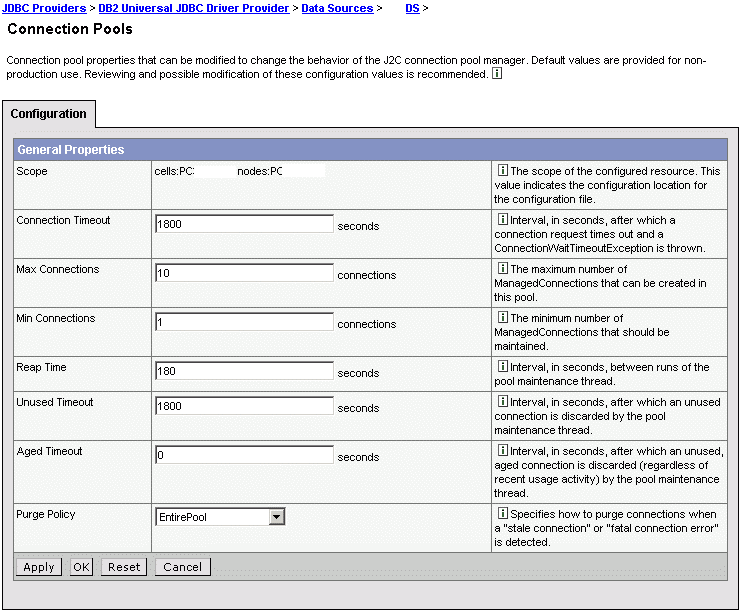
The "sweet spot" for a small (4 CPU) database server is servicing 100-200 connections. To change the connection pool size from WebSphere administrative console, click Resources > JDBC Providers > JDBC_provider > Data Sources > data_source > Connection Pool. This setting is illustrated in the following picture.


TURN ON SERVLET CACHING
To turn servlet caching on or off from WebSphere administrative console, click Servers > Application Servers > server_instance > Web container and check or uncheck the "Enable servlet caching" checkbox. The following diagram illustrates these step.


MODIFY THREAD POOL COUNT
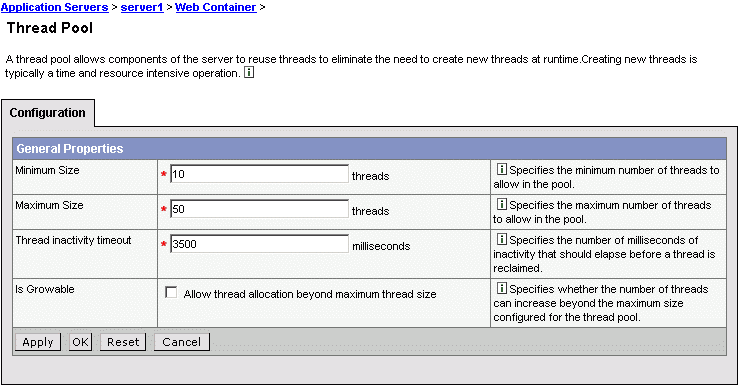
A CPU can drive 50 to 75 Java threads. To modify the thread count through WebSphere Administrative console, click Servers > Application Servers > server_instance > Web container > Thread Pool and modify the Minimum size and Maximum size of the thread pool. The following diagram illustrates this step.


All the tips described above are from the latest article on WebSphere Performance Tuning for the impatient on Developerworks. This post is a simple description of how to achieve the steps described there (in Jython) using the WAS administrative console. For more information, refer to the article.

Thursday, 4 July 2013

Missing PDPrincipal with TAI+

We configured websphere trust association with Tivoli Access Manager. It works fine when we tested it with individual logins. But when we tried to load test the authentication and authorization using TAM and TAM's Authorization API , the PDPrincipal of the subject was lost in a significant number of cases. When we contacted IBM about this, they suggested that we apply PK00852 to websphere, which is available from websphere cumulative fix pack 5.1.1.4. Although the fix does not directly address the problem at hand, we could load test TAM authentication and authorization with Azn API successfully. Probably TAI+ creates a custom cache key and modifies the subject with information that cannot be retrieved from the user registry alone. For more on custom JAAS subjects and cache keys in websphere, refer to this article in the WebSphere technical Journal. This is what IBM has to say about the APAR fix mentioned above.

IBM - PK00852: SSO tokens with custom cacheKey from TAI are not handled
correctly: "When using the security attribute propagation token framework or the
cacheKey property within a Hashtable login to affect the custom cache key of a
Subject, an SSO token containing this custom cache key will result in a cache
miss at a backup server. This will cause either a DynaCache hit (if configured)
or an MBean retrieval to get the Subject contents. In cases where the
originating server is down, the LTPA token will be used to login, but it's
unlikely the custom attributes will be preserved in that situation. To
accommodate the behavior of a new challenge whenever these custom attributes
cannot be retrieved, any SSO token containing the custom cache key that cannot
retrieve the originating attributes will, by default, result in a new
authentication challenge. However, there will be a property that can be used to
change to the old login using the token behavior."

Monday, 1 July 2013

Java EE 5 on WebSphere

While the next version of WAS (v7.0) with Java EE 5, is yet to be released, you can now test some of the features such as EJB 3.0 with WebSphere software early programs. The new features are available as feature packs for the current WebSphere Application Server (v6.1).

LinkWithin

Related Posts Plugin for WordPress, Blogger...